<?xml version="1.0" encoding="utf-8"?><feed xmlns="http://www.w3.org/2005/Atom" ><generator uri="https://jekyllrb.com/" version="3.10.0">Jekyll</generator><link href="https://glimmer.gwizlabs.net/feed.xml" rel="self" type="application/atom+xml" /><link href="https://glimmer.gwizlabs.net/" rel="alternate" type="text/html" /><updated>2025-09-04T00:59:28-05:00</updated><id>https://glimmer.gwizlabs.net/feed.xml</id><title type="html">Glimmer</title><subtitle>Things that I am thinking about or learning (either through reading or by school of hard knocks). These are my personal thoughts and not necessarily the positions or thoughts of any organization I am associated with.</subtitle><author><name>Dave Green</name></author><entry><title type="html">Evernote Sharing Behavior and Implications for Family Sharing</title><link href="https://glimmer.gwizlabs.net/blog/2024/05/17/evernote-sharing-behavior/" rel="alternate" type="text/html" title="Evernote Sharing Behavior and Implications for Family Sharing" /><published>2024-05-17T00:00:00-05:00</published><updated>2024-05-17T00:00:00-05:00</updated><id>https://glimmer.gwizlabs.net/blog/2024/05/17/evernote-sharing-behavior</id><content type="html" xml:base="https://glimmer.gwizlabs.net/blog/2024/05/17/evernote-sharing-behavior/"><![CDATA[<p>While the popups are confusing, the owner of the shared Notebook controls the behavior of the Notes, effectively owning the Notes. Having a concept of ownership is useful in some situations.  However, it presents challenges to the survivability of the Notes if the owner account is closed due to death or some other reason.</p>

<p>This article is focused on ownership and allowing a user to preserve content when one of the accounts is gone. It does not explore limiting access by “Edit” or “View” rather than “Share, Edit” interacts between owner settings and Notebook share settings.</p>

<p>Similarly, this article does not discuss trying to ensure that Notes disappear when the Note (or containing Notebook owner) account is closed.</p>

<p>This article discusses what happens to individual Notes in various scenarios and then lays out strategies for mitigating issues.</p>

<h2 id="actions">Actions</h2>

<h3 id="sharing-the-notebook">Sharing the Notebook</h3>

<p>For this article, I created a new Notebook, SharedByDave, and then shared that Notebook with my wife through the right-click menu on this new Notebook or the <code class="language-plaintext highlighter-rouge">…</code> menu on the Notebook contents column. After I share, an email gets sent to her. She goes into Evernote, and at the bottom of the left panel, she can select <code class="language-plaintext highlighter-rouge">Shared With Me</code> and then see the new shared Notebook in the middle column. Clicking on this Notebook will cause it to be placed into her Notebook list.</p>

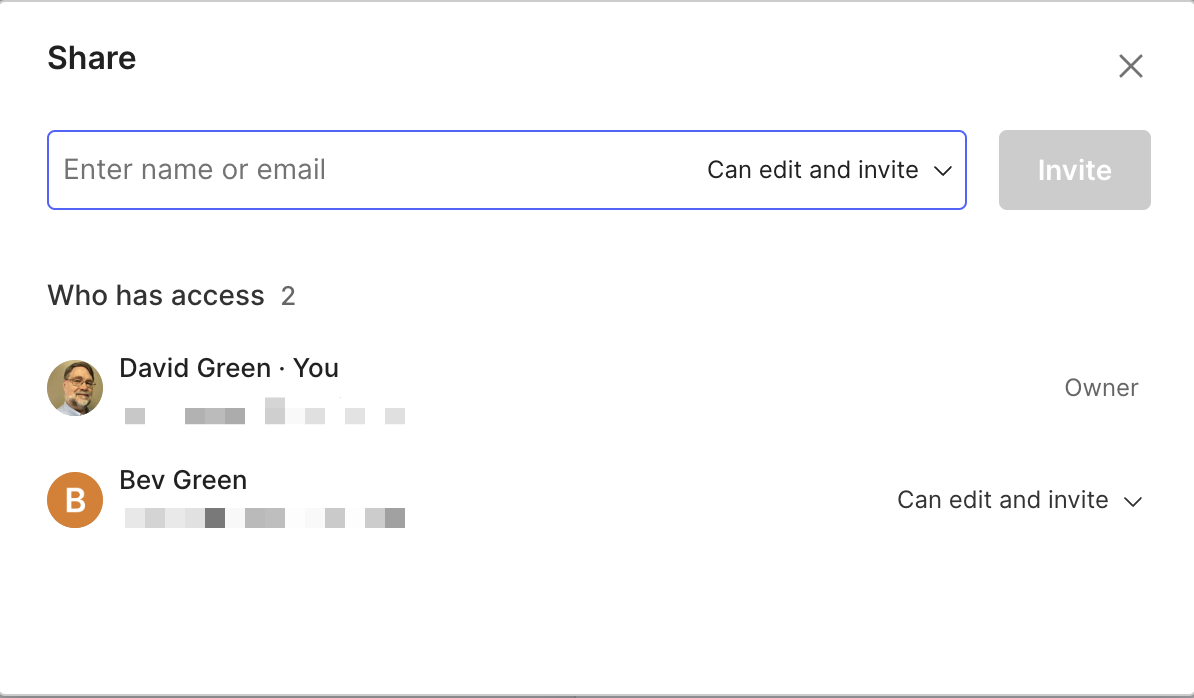
<p>After sharing and waiting for synchronization delays, the sharing status can be seen in a popup by revisiting the share steps or right-clicking on the green people in the middle pane.</p>

<p><img src="/assets/images/CleanShot%202024-06-11%20at%2023.23.49@2x.png" alt="" /></p>

<p>The shared Notebook is not required to be in the same stack (or be in a stack) for each user. The graphic is my view, but my wife’s view of the shared Notebook is similar.</p>

<h3 id="creating-a-note-in-the-shared-notebook">Creating a Note in the shared Notebook</h3>

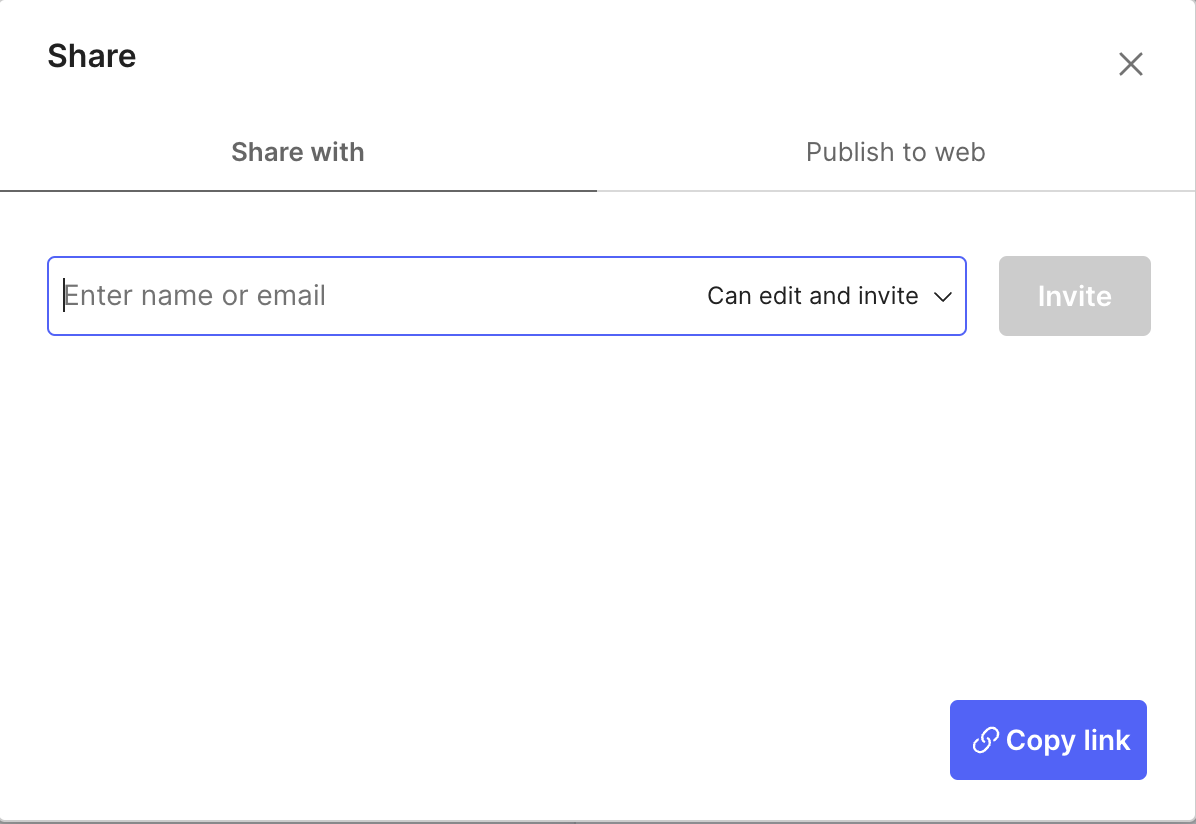
<p>If I create a Note in the shared Notebook, it will be owned by me but visible to my wife. Looking at the Note’s sharing information, I see the green people with a count of 2, showing that the Note is shared with two users. However, looking at the promised permission details, the pop-up does not show who can access the Note but does allow me to share the Note with others. This is because the effective sharing is at the Notebook level, not the Note level.</p>

<p><img src="/assets/images/CleanShot%202024-06-12%20at%2000.04.26@2x.png" alt="" /> My View of Shared Note</p>

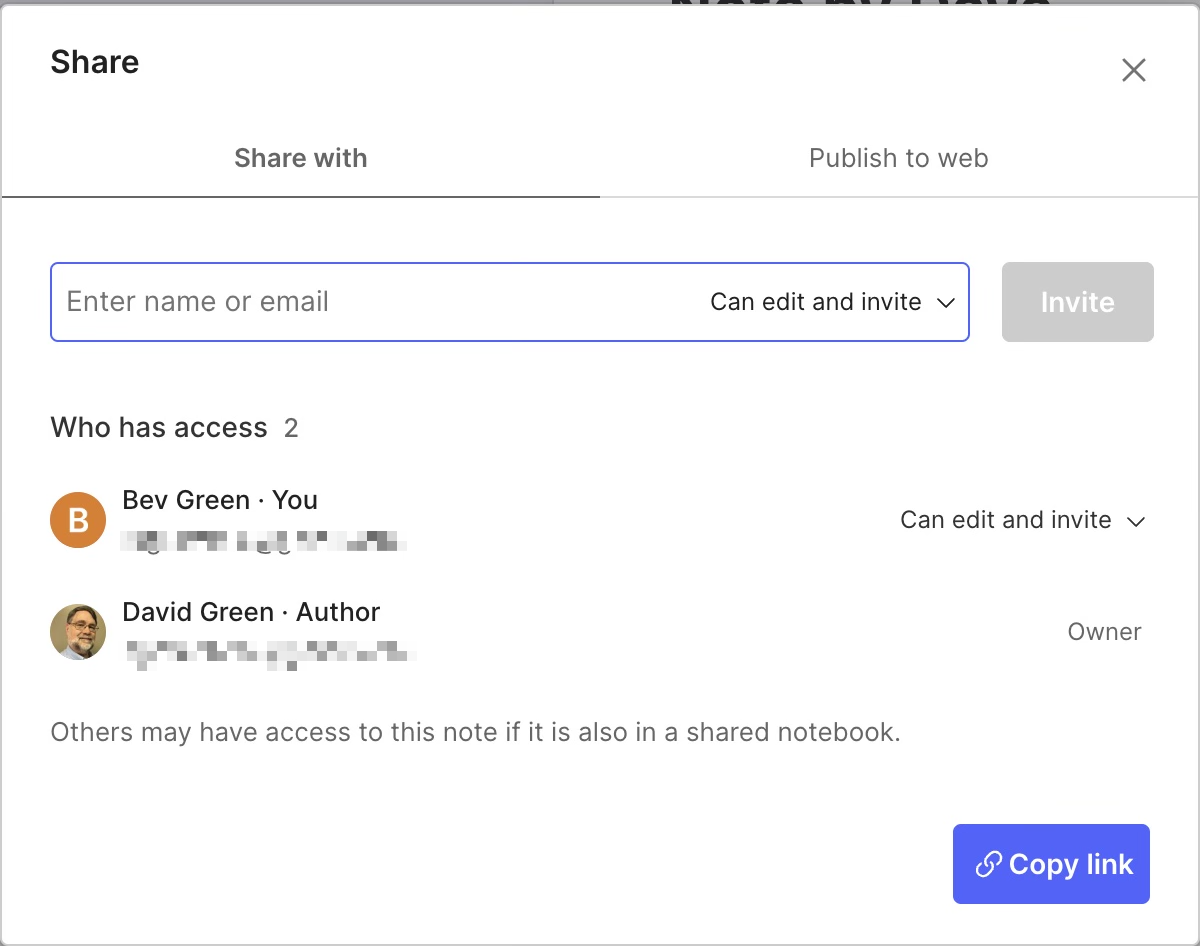
<p>My wife’s view is more detailed. It shows that I own the Note and that she has specific permissions. While her access is shown in a dropdown, she cannot change it.</p>

<p><img src="/assets/images/Image%206-12-24%20at%2012.09 AM.png" alt="" />  My wife’s view of the Note’s sharing status</p>

<p>If my wife creates a Note in this shared Notebook I own, the views are reversed.</p>

<h3 id="moving-a-private-note-into-the-shared-notebook">Moving a private Note into the shared Notebook</h3>

<p>If my wife creates a Note in a private Notebook, the Note is not shared. Moving the Note into a Notebook I own, I now have access just as if she had initially created the Note in the shared Notebook, but she appears to retain ownership. Our view of sharing also looks like she had created the Note in the shared Notebook.</p>

<h3 id="duplicating-a-note-not-owned-by-the-shared-notebook-owner">Duplicating a Note not owned by the shared Notebook Owner</h3>

<p>I can take ownership of the “content” of the Note by duplicating the Note she owns (and potentially deleting the original.) The permissions will look as if I created the Note. However, if one examines the Note Info (in the Note’s <code class="language-plaintext highlighter-rouge">…</code>menu), she will be shown as the author. Note that links to the original Note will not point to the duplicate even if the original is deleted.</p>

<h3 id="deleting-the-shared-note-in-a-shared-notebook">Deleting the shared Note in a shared Notebook</h3>

<p>If I delete a Note in a shared Notebook I own, it disappears from both of our Notebooks but only shows in the Trash on my computer (and thus could only be restored by me) regardless …the creator/owner. If my wife deletes a note in a shared Notebook I own, it disappears from both our copies of the Notebook regardless of the creator/owner. It only shows in the Trash on my computer and can only be restored by me.</p>

<h3 id="deleting-the-shared-notebook">Deleting the shared Notebook</h3>

<p>Something unexpected happened when I, as the owner, deleted the shared Notebook. As expected, the Notebook disappeared from my computer, and the Notes were in the Trash.  The Notebook was gone on my wife’s computer, but the Notes were also unexpectedly in the Trash on her computer!  This was not repeatable. In subsequent attempts, the Notes on my wife’s computer were not in Trash but gone (as documented by Evernote).  Restoring the Note from Trash on placed that Note in the default Notebook.</p>

<h3 id="finding-non-owned-notes">Finding non-owned Notes</h3>

<p>It does not appear that searching for non-owned Notes or Notebooks is possible other than manually examining them one at a time and looking for the non-owner pattern in the Note’s share permissions.</p>

<h3 id="tags">Tags</h3>

<p>As Notebook owner, I can apply Tags to any and all Notes in the Notebook. My wife can only apply Tags already used within that shared Notebook. Similarly, should she take a private Note with a tag unique to her system, it will be removed when she transfers the note to a Notebook shared by me.</p>

<h3 id="taking-ownership-through-duplication">Taking ownership through duplication</h3>

<p>One can become the content owner by duplicating the Note, deleting the original Note, changing the name back to the original name (remove “- Copy 1”), and repairing any Notes that pointed to the original Note and now need to point to this Note. This does not seem to be a necessary step since the actual Note ownership information seems to be ignored when in a shared Notebook.</p>

<h3 id="ownership-is-not-presently-part-of-an-enex-file">Ownership is not presently part of an ENEX file</h3>

<p>Since ownership is NOT stored in an ENEX file, one can assume ownership of the content by exporting/importing an ENEX file. There are issues with what is lost in this movement discussed elsewhere.</p>

<h2 id="mitigation-strategies">Mitigation Strategies</h2>

<p>In this section, I will explore steps to avoid losing shared content if the owner of the shared Notebook account dies.</p>

<h3 id="chose-to-keep-both-accounts">Chose to keep both accounts</h3>

<p>The easiest mitigation approach is to keep both accounts. This may involve cost and, ideally, access to all credentials. This will preserve everything including links as no changes are made.</p>

<p>Letting the shared Notebook-owning account lapse from paid to free (as long as those accounts are not closed) should also work. However, there is a risk that Evernote will change the rules on free accounts, which could defeat this non-paying for dormant accounts approach. I have not explored this path.</p>

<h3 id="have-one-user-own-all-notebooks-and-plan-to-take-over-this-account">Have one user own all Notebooks and plan to take over this account</h3>

<p>If I own all of the Notebooks, then I am the effective owner of all content, and all content must be stored in my Notebooks owned by my account. If not all my Notebooks are shared, my wife’s computer could have a subset of the data. Easy transferring ownership of the data would involve my wife taking over my Evernote account and deleting any Notebooks she does not want. She could close her account. It is possible to change the user information on an account. However, she might need a second email or userid to avoid conflicting with her original account before it is closed.</p>

<p>This approach will preserve the links to Notes.</p>

<h3 id="export-to-enex-and-reimport-links-break">Export to ENEX and reimport (links break)</h3>

<p>One can take ownership of the content by</p>

<ul>
  <li>exporting a Notebook’s content to ENEX,</li>
  <li>importing in the ENEX into a new Notebook,</li>
  <li>deleting the old Notebook on the original shared Notebook owner’s computer, and then</li>
  <li>resharing by the new owner.</li>
</ul>

<p>If one periodically backs up Evernote to ENEX files, this can be accomplished after the original shared Notebook’s owner’s account is terminated.</p>

<p>Alas, this will break all links to Notes.</p>

<p>A more manual version of this approach is to duplicate the files on the non-owner machine and then copy those duplicates into new private folders. It is much more work, and it may preserve some information that does not get exported into the ENEX files, but Note links will still be broken.</p>

<h3 id="seek-evernote-enhancements">Seek Evernote Enhancements</h3>

<ul>
  <li>Allow taking ownership of Notebook(s) rather than deleting (or making it an option to do so), perhaps with permission from the original account.</li>
  <li>Solve the ENEX linkage issue to allow ENEX recovery</li>
</ul>

<h2 id="conclusions">Conclusions</h2>

<p>Understanding what will happen if one of the accounts is removed is important in planning the shared system that survives. In a non-Teams Evernote shared system, understanding who owns the shared Notebook is crucial to ensuring its Notes remain available. Evernote’s current practice of moving a paid account into free status can mitigate some issues for users who still need access.</p>

<p>Evernote could provide additional clarity by showing the full permissions on a Note in all cases and commenting to show when the shared Notebook’s permissions are used. Hopefully, they will do this and provide a “take ownership” solution for this scenario.</p>]]></content><author><name>Dave Green</name></author><category term="productivity" /><category term="#evernote" /><summary type="html"><![CDATA[Evernote sharing behavior and implications for family sharing]]></summary></entry><entry><title type="html">Migration from Evernote to Obsidian</title><link href="https://glimmer.gwizlabs.net/blog/2024/01/17/migrate-from-evernote-to-obsidian/" rel="alternate" type="text/html" title="Migration from Evernote to Obsidian" /><published>2024-01-17T00:00:00-06:00</published><updated>2024-01-17T00:00:00-06:00</updated><id>https://glimmer.gwizlabs.net/blog/2024/01/17/migrate-from-evernote-to-obsidian</id><content type="html" xml:base="https://glimmer.gwizlabs.net/blog/2024/01/17/migrate-from-evernote-to-obsidian/"><![CDATA[<p>This article discusses migrating content from Evernote to Obsidian.   ~While I have decided to stay with Evernote presently, I have worked through the migration and tried out Obsidian several times.  It is my current “plan b” should something come that makes Evernote cease to make sense for me.  I decided I should collect my notes so I could save (and share) what I have learned about migrating from Evernote to Obsidian.  My latest cycle was with Evernote 10.92.3 to Obsidian 1.6.3.</p>

<h2 id="why-obsidian">Why Obsidian</h2>
<p>Some of the features that might encourage one to migrate to Obsidian:</p>
<ul>
  <li>Powerful</li>
  <li>Has a mechanism for family sharing that I have worked out which allows limited files to Bev and all files to me with linkage (as does Evernote)</li>
  <li>Local Files</li>
  <li>Markdown</li>
  <li>Grammarly works</li>
  <li>Better linkage</li>
  <li>Bug level seems low with fast potential reconciliation</li>
  <li>Some graphics creation</li>
  <li>Shared content won’t disappear with disappearance of account owner</li>
  <li>Software development not routinely exposing (paying) users to regression bugs</li>
  <li>URIs work</li>
  <li>Price</li>
</ul>

<h2 id="why-obsidian-hurts">Why Obsidian hurts</h2>
<p>No tool is an exact match for Evernote, so there are places where Obsidian may be considered undesirable (or for some even unacceptable):</p>
<ul>
  <li>Collaboration on a subset of the collection (vault) is difficult</li>
  <li>One may not feel comfortable editing Markdown</li>
  <li>Reorganization can be a bit challenging with attachments</li>
  <li>Table limitations</li>
  <li>Auto OCR is limited</li>
  <li>Multi-component updates (styles, plug-ins, core, installer)</li>
  <li>Mobile client can be challenging, UI and subject to overload with my vault sizze</li>
</ul>

<p>Notes in Evernote appear to contain text, links, and various attachments.  When you move a note, everything moves.  When a note links to another note, the linkage is done by an identity string that is independent of the Note title, the Note’s present Notebook, and the Notebook’s Stack.  So moving Notes around does not break links nor raise any issues with embedded content.   In Obsidian, the basic note file is a markdown text file.  It contains links to files that are embedded in the note (from the user’s point of view), and linkages are based on filenames.  Alas, Evernote does not presently help too much with linkages to other notes.  The exported ENEX file notes a link to another Note, but the linkage is based on the displayed text (not the underlying identity code).  This means that if the link in the Note in Evernote has a text view that matches the title of the destination Note, then the migration process will create a successful linkage, but if the original text view does not match the title, then a broken link will result.  This happens if the text view has been manually edited or if the destination Note’s title has been changed without going back and fixing the text view of the link.   There is more flexibility in linking in Obsidian that can be exploited post-migration.</p>

<h3 id="text-vs-title-note-link-representation-in-evernote">Text vs Title Note Link Representation in Evernote</h3>

<p>Evernote has three represenations for note links: 1) text, 2) title and 3) preview.  The linkage that Yarle does is by text. If the format is title, then the text will be the (original) title.  One can “fix” text links if there has been a text change or a title change by toggling the link from text to title format and back.  Alas, I don’t know of automated way to do this across all notes.</p>

<h2 id="migration-approaches">Migration Approaches</h2>
<p>One can either migrate everything in Evernote to Obsidian, start anew in Obsidian, or do a partial content migration.  In any case, the Evernote account may be used as an archive (for free, at least under the present Evernote policy).</p>
<h2 id="migration-assuming-there-is-data-to-move">Migration (assuming there is data to move)</h2>
<p>Basically, the steps are:</p>
<ol>
  <li>Pre-migration clean-up</li>
  <li>Export to ENEX Files</li>
  <li>Conversion of ENEX files to folders</li>
  <li>Installing folders in Obsidian</li>
</ol>

<h3 id="pre-migration-clean-up">Pre-migration clean-up</h3>
<p>Since Evernote and Obsidian have different rules for tags and titles, you may wish to do some pre-work in Evernote before beginning the process.  I have written an <a href="https://glimmer.gwizlabs.net/blog/2023/09/11/evernote-naming-for-interoperability/">article</a> discussing some of the issues.</p>

<p>The <a href="https://github.com/akosbalasko/yarle#note-links-over-notebooks-no-problem-here-is-what-to-do">Yarle documentation</a> suggests making a TOC note of all notes in each notebook to reduce errors in bad linking due to duplicate note names.</p>

<h3 id="export-to-enex-files">Export to ENEX Files</h3>

<p>After any note cleanup, the Evernote content may be exported to ENEX files.  It is probably best to do this Notebook by Notebook, either using a desktop Evernote client or all notebooks at once using a tool like <a href="https://github.com/vzhd1701/evernote-backup">evernote-backup</a>.</p>

<p>A limitation of evernote-backup is that it does not handle the new Evernote Task since the Evernote API it uses does not support Evernote Tasks.  A workaround is to use the desktop client to export those specific notebooks to override the ones made by the evernote-backup export` process.</p>

<h3 id="conversion-of-enex-files-to-folders">Conversion of ENEX files to folders</h3>
<p>There are two approaches to the conversion of ENEX files to folders. They both transform ENEX files into folders with the same name as the ENEX file.  There is a community plugin named <a href="https://help.obsidian.md/Plugins/Importer">Importer</a> that can do the import process with certain decisions built in to the process.  The Obsidian help site has <a href="https://help.obsidian.md/import/evernote">details on its usage</a>.</p>

<h4 id="obsidian-importer">Obsidian Importer</h4>
<p>This community plug-in needs to be installed, and then it is simply a matter of pointing it at your ENEX files and doing the import.  The imported Notebook (folder) may need to be moved into the correct location in the folder in your structure.</p>

<p>The built-in decisions of the Importer cause</p>
<ol>
  <li>Duplicates the filename as an initial H1 (heading) in the file</li>
  <li>Does not on, its own, put things into folders associated with stacks</li>
  <li>Insert hex codes A0 20 at the end of line from time to time</li>
  <li>Does not handle BusyCal event URIs as well as many others</li>
  <li>Does not handle tel URIs</li>
  <li>Does not translate Evernote Note tasks to Task Plug-In tasks but rather to just a checklist item</li>
  <li>Converts tags like IGNORE_OT converted to IGNORE/OT</li>
  <li>Puts attachments in a lower-level folder per page (which is probably a good compromise), but it does not seem to be supported by the basic Obsidian approach. There is no “in a subfolder named for the note, which is itself in a subfolder under the current folder”.</li>
</ol>

<h4 id="yarle-importer">Yarle Importer</h4>
<p>The second process is to use the standalone tool Yarle to maintain more control of the process.  This is more flexible and allows one to use the current version of Yarle.</p>

<p><img src="/assets/images/image-20240112233718590.png" alt="Welcome | Select Enex files | Configuration | Set Template | Pick an output location | Convert" />
Top panel in the Yarle tool.</p>

<p>As shown above, there are several input steps followed by conversion:</p>
<ol>
  <li>Welcome - documentation on Yarle and the conversion process</li>
  <li>Select Enex files - select all the ENEX files you want to import with this pass of running Yarle</li>
  <li>Configuration - control the conversion (see below)</li>
  <li>Set template - control the structure of the generated note</li>
  <li>Pick an output location - I tend to pick a space that is NOT inside an Obsidian vault</li>
  <li>Convert - let Yarle do its thing</li>
</ol>

<p>I have decided to migrate all ENEX files at once, so I select them in blocks and just let them accumulate in the tool.  You can move to different folders and select them.  Note that they will all be placed into a set of folders at one level (losing which Notebook was in which Stack).  I use a simple script to restore the Stack (nested folders) structure that I want in Obsidian but this could be done manually.</p>

<p>In the <strong>Configuration</strong> step, I use the following (where red boxes highlight changes from the default):</p>

<p><img src="/assets/images/yarle-options.png" alt="The options used for Yarle" /></p>

<p>In the <strong>Set Template</strong> step, I replace the default template with the following:</p>

<pre><code class="language-yarle">---
{tags-array-block}tags: {tags-array}{end-tags-array-block}
{location-block}location: {location}{end-location-block}
{reminder-time-block}Remind: {reminder-time}{end-reminder-time-block}
{source-url-block}url: {source-url}{end-source-url-block}
{created-at-block}created: {created-at}{end-created-at-block}

{content-block}{content}{end-content-block}
---
</code></pre>

<h4 id="convert">Convert</h4>
<p>This step may take a while, and the status display quickly fills up and becomes hard to scroll with a large number of ENEX files.   I tend to look at the output directory to see an ever-increasing number of files and folders to check progress.</p>

<h3 id="installing-folders-into-obsidian">Installing folders into Obsidian</h3>
<p>I arranged the folders representing the imported Notebooks into the structure I desired (very similar to the Stack structure in Evernote) and then moved the collection into the Obsidian Vault (folder).</p>

<p>At this point, Obsidian should recognize the files and reindex.  It will do this automatically when starting if needed.</p>

<p>You can now look at the new files and begin to look around.</p>

<p>I recommend Custom Attachment Location plugin which will try to keep the structure of attachments “sane” where a note yyy in the folder xxx will have it’s attachments in xxx/_resources/yyy.</p>

<h2 id="in-closing">In closing</h2>

<p>As noted in the beginning, the migration to Obsidian has not stuck (yet).  I have written this up to share with others and to record the process so that I can relatively quickly do the migration again if needed.  My Evernote account has about 9000 notes and the exported ENEX files occupy about 5GB.  Using an already sync’ed <code class="language-plaintext highlighter-rouge">evernote_backup</code> database, I can export the ENEX files, run Yarle and get them into Obsidian in 4 hours or so.  If I manually export ENEX for each Notebook containing a reminder or an Evernote Task, it can take a bit longer.</p>

<p>There will be broken links due to a variety of issues, the most frequent being the renaming of a note without going back to the source note and changing its link text.  I find that I can usually figure out the correct linkage but if not, I can go to Evernote and figure things out and manually fix them.  All in all, the migration from Evernote to Obsidian with this approach works pretty well and requires fewer fixups than all the other tools I have tried migrating to.</p>

<hr />

<h3 id="2024-06-20-update">2024-06-20 Update</h3>
<ol>
  <li>Updated the section on the Yarle Importer to reflect the configuration used.</li>
  <li>Updated the Obsidian Pros and Cons to reflect my current thinking and changes in Obsidian and Evernote.</li>
</ol>

<h3 id="2024-01-27-update">2024-01-27 Update</h3>
<ol>
  <li>Added suggestion from Yarle documentation re TOC note</li>
  <li>Added section on Evernote Note Link Representation</li>
</ol>]]></content><author><name>Dave Green</name></author><category term="productivity" /><category term="#evernote" /><category term="#obsidian" /><summary type="html"><![CDATA[An approach to migrating from Evernote to Obsidian]]></summary></entry><entry><title type="html">WikiLink Helper for Evernote</title><link href="https://glimmer.gwizlabs.net/blog/2023/09/11/wikilink-helper-for-evernote/" rel="alternate" type="text/html" title="WikiLink Helper for Evernote" /><published>2023-09-11T00:00:00-05:00</published><updated>2023-09-10T00:00:00-05:00</updated><id>https://glimmer.gwizlabs.net/blog/2023/09/11/wikilink-helper-for-evernote</id><content type="html" xml:base="https://glimmer.gwizlabs.net/blog/2023/09/11/wikilink-helper-for-evernote/"><![CDATA[<blockquote>
  <p>A solution for MacOS using Keyboard Maestro</p>
</blockquote>

<p>Like many folks, I have been exploring migrating from one PKM tool to another.  One of the nice thing about tools like Obsidian is that they support text links such as <code class="language-plaintext highlighter-rouge">[[Evernote - Converting text matching a note title to link in a note]]</code> which matches the title of this page.  It is a form of <a href="https://ia.net/writer/support/library/wikilinks">WikiLink</a>.  Software that supports this markdown syntax operationally links to the named page when the content is typed.  Generally it is presented as underlined text emphasizing the link behavior.</p>

<p>Recently, Evernote introduced an “add note link” command which will insert an internal (app) link to an Evernote page at the present cursor position.  On the Mac, it is bound to ⌥+⌘+K by default.   After issuing the command, one then selects the note by either searching for it by (partial) title or by walking through the hierarchy of existing notes.  After selecting the desired note and confirming, an Evernote App Link for the chosen note is inserted at the present cursor position.</p>

<p>Evernote does not support the Wikilink syntax for creating links nor during import from sources that do.  This note describes a <a href="https://www.keyboardmaestro.com/main/">Keyboard Maestro</a> macro that will convert a selected WikiLink (or just text) to the Evernote page provided such a page or a very close match exists for those that run Evernote on a Mac and have Keyboard Maestro.  Perhaps one day, this will be a recognized pattern just like <code class="language-plaintext highlighter-rouge">[txt](https://address)</code> followed by a space gets you a link <a href="https://address">txt</a>, typing text inside double brackets <code class="language-plaintext highlighter-rouge">[[text]]</code> followed by a space will kick off the insertion action for an Evernote app link.</p>

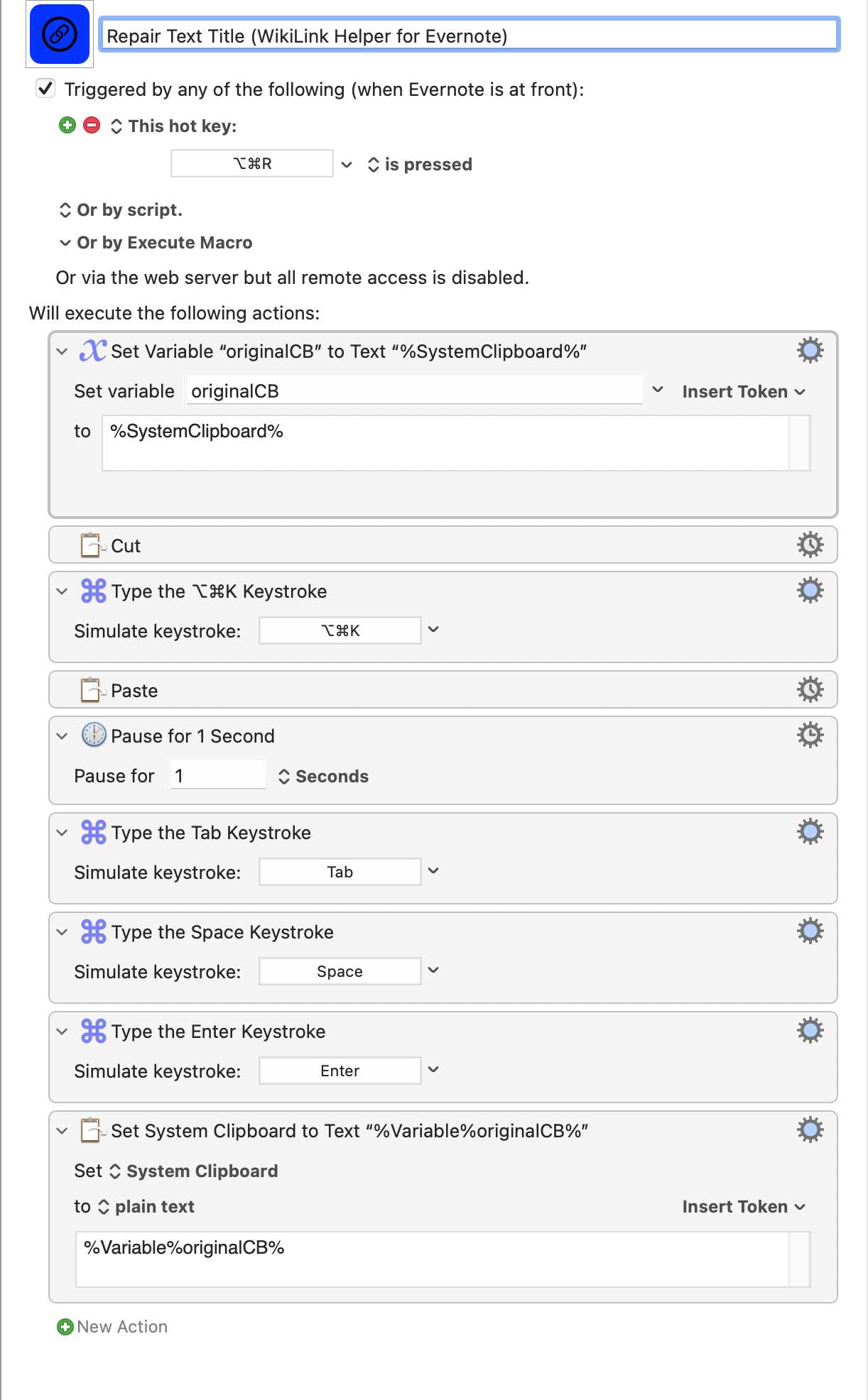
<p>I have mapped the macro to ⌥+⌘+R (repair) since my first use case was to repair links brought over from other tools.  I use ⌥+⌘+W for something else so I never changed the shortcut.  The shortcut uses the clipboard but the original value is saved and restored.</p>

<p>The macro takes advantage of the fact that the Evernote search for note will essentially ignore the <code class="language-plaintext highlighter-rouge">[[</code> and <code class="language-plaintext highlighter-rouge">]]</code> if they exist as long as that is not in the title of some notes.</p>

<h2 id="wikilink-helper-for-evernote-keyboard-maestro-macro">WikiLink Helper for Evernote (Keyboard Maestro Macro)</h2>

<p><img src="/assets/images/WikiLink-Helper-KM-macro.png" alt="WikiLink Helper for Evernote" /></p>

<h2 id="limitations">Limitations</h2>

<ol>
  <li>
    <p>If there are multiple notes that match, it may choose the wrong one.  If there is no match, the text is swallowed up.   Undo (twice) is your friend for these cases.</p>
  </li>
  <li>
    <p>Evernote needs time to respond to when finding matching pages so there is a 1 second pause inserted in the sequence.  The amount of time was chosen to be generous on my machine (M1) but it could be that an older machine might need longer times.</p>
  </li>
</ol>

<h2 id="installing">Installing</h2>

<p>One should be able to import the macro by importing this <a href="/assets/files/WikiLink-Helper-for-Evernote.kmmacros">file</a> into Keyboard Maestro.  <!-- The macro is also available in the [Keyboard Maestro] forum. --></p>]]></content><author><name>Dave Green</name></author><category term="productivity" /><category term="#evernote" /><summary type="html"><![CDATA[Transform a Wikilink app link in Evernote]]></summary></entry><entry><title type="html">Evernote Naming for Interoperability</title><link href="https://glimmer.gwizlabs.net/blog/2023/09/11/evernote-naming-for-interoperability/" rel="alternate" type="text/html" title="Evernote Naming for Interoperability" /><published>2023-09-11T00:00:00-05:00</published><updated>2023-09-11T00:00:00-05:00</updated><id>https://glimmer.gwizlabs.net/blog/2023/09/11/evernote-naming-for-interoperability</id><content type="html" xml:base="https://glimmer.gwizlabs.net/blog/2023/09/11/evernote-naming-for-interoperability/"><![CDATA[<p>Evernote is extremely flexible in naming rules for stacks, notebooks, and tags.
However, this flexibility can lead to problems when trying to export Evernote to another system such as Obsidian.
This post outlines some naming conventions that one can use to improve interoperability.</p>

<h2 id="stacks-and-notebooks">Stacks and Notebooks</h2>

<p>Stacks are a collection of notebooks, and notebooks are a collection of notes. Many other systems map stacks and notebooks to folders, and notes to files.  Thus, stacks, notebooks, and files should follow the same naming rules as folders and files in the operating system and should:</p>

<ol>
  <li>not contain any of the following characters: <code class="language-plaintext highlighter-rouge">\/:*?"&lt;&gt;|</code></li>
  <li>not end with a period</li>
  <li>not end with a space</li>
  <li>not start with a space</li>
  <li>not start with a period or tilde</li>
  <li>not contain any of the following reserved words: <code class="language-plaintext highlighter-rouge">CON</code>, <code class="language-plaintext highlighter-rouge">PRN</code>, <code class="language-plaintext highlighter-rouge">AUX</code>, <code class="language-plaintext highlighter-rouge">NUL</code>, <code class="language-plaintext highlighter-rouge">COM1</code>, <code class="language-plaintext highlighter-rouge">COM2</code>, <code class="language-plaintext highlighter-rouge">COM3</code>, <code class="language-plaintext highlighter-rouge">COM4</code>, <code class="language-plaintext highlighter-rouge">COM5</code>, <code class="language-plaintext highlighter-rouge">COM6</code>, <code class="language-plaintext highlighter-rouge">COM7</code>, <code class="language-plaintext highlighter-rouge">COM8</code>, <code class="language-plaintext highlighter-rouge">COM9</code>, <code class="language-plaintext highlighter-rouge">LPT1</code>, <code class="language-plaintext highlighter-rouge">LPT2</code>, <code class="language-plaintext highlighter-rouge">LPT3</code>, <code class="language-plaintext highlighter-rouge">LPT4</code>, <code class="language-plaintext highlighter-rouge">LPT5</code>, <code class="language-plaintext highlighter-rouge">LPT6</code>, <code class="language-plaintext highlighter-rouge">LPT7</code>, <code class="language-plaintext highlighter-rouge">LPT8</code>, <code class="language-plaintext highlighter-rouge">LPT9</code></li>
</ol>

<p>For example, I had used .Inbox for a Notebook but when it got ported to another system, the .Inbox directory was hidden from normal view. I had to rename it to _Inbox to make it visible.</p>

<p>I found notes are harder to manage within a restrictive naming convention, given the need for friendly, informative titles and auto-generated names from clipping activities.</p>

<h2 id="tags">Tags</h2>

<p>Evernote does not put many restrictions on tags either.  They can be multi-word with space separating the words, and can contain special characters.  However, many other PKM/Note systems do not allow spaces in tags, and some do not allow special characters.  Consider limiting tags to only alphanumeric characters and hyphens.</p>

<p>I found lots of issues with my tag usage.  Below are my original tags, and more interoperable tags.</p>

<table>
  <thead>
    <tr>
      <th>Original Evernote Tag</th>
      <th>Interoperable Tag</th>
      <th>Comment</th>
    </tr>
  </thead>
  <tbody>
    <tr>
      <td>!not Agenda</td>
      <td>NOT_AGENDA</td>
      <td>meta info: all caps, use _ between words</td>
    </tr>
    <tr>
      <td>command line</td>
      <td>commandLine</td>
      <td>use camel case for multi-word topics or hyphens</td>
    </tr>
    <tr>
      <td>@FredJones</td>
      <td>FredJones</td>
      <td>Use Pascal case for proper names</td>
    </tr>
  </tbody>
</table>

<p>You can wait to fix these problems as you migrate (if you do) but it may be useful to adopt naming conventions that provide interoperability to reduce the friction and time of migration later.</p>

<p>Update: 2023-12-20</p>

<p>I use <a href="https://github.com/vzhd1701/evernote-backup">evernote-backup</a> to backup my Evernote notes to a local directory.  I have noticed that tag name changes do NOT get reflected in the backup database.  To fix, I had to reinitialize the database used by evernote-backup.  This is another reason to adopt interoperable naming conventions early.</p>]]></content><author><name>Dave Green</name></author><category term="productivity" /><category term="#evernote" /><category term="#naming" /><category term="#interoperability" /><summary type="html"><![CDATA[Naming considerations for Evernote to make improve Interoperability"]]></summary></entry><entry><title type="html">And back to Evernote</title><link href="https://glimmer.gwizlabs.net/blog/2022/12/19/and-back-to-evernote/" rel="alternate" type="text/html" title="And back to Evernote" /><published>2022-12-19T10:00:00-06:00</published><updated>2022-12-19T10:00:00-06:00</updated><id>https://glimmer.gwizlabs.net/blog/2022/12/19/and-back-to-evernote</id><content type="html" xml:base="https://glimmer.gwizlabs.net/blog/2022/12/19/and-back-to-evernote/"><![CDATA[<p>The title gives it away.  I have moved my main effort back to Evernote.  The number one reason was that Evernote was known to my spouse who collaborates and shares some of the content with me.  Evernote supports several features: “normal editing” (at least for minor edits) rather than a change from visual to Markdown, better printouts, and less confusing behavior between desktop and iOS.</p>

<p>Additional reasons (from me) included</p>

<ul>
  <li>better (but not perfect) tools for backup of Evernote exist (using <a href="https://pypi.org/project/evernote-backup/">evernote-backup</a>)</li>
  <li>addition of several ways to embed links to other documents that are often more convenient than first getting the internal link to note</li>
  <li>Evernote embeds the page’s objects like images and pdfs which permits easier movement of notes around (less risk of losing something)</li>
  <li>Evernote scans PDFs and OCRs images</li>
  <li>Web Clipping</li>
</ul>

<p>There are several things I miss, and I plan to keep Obsidian around at least to provide a shell to host <a href="https://github.com/zsviczian/obsidian-excalidraw-plugin">ExcaliDraw</a> and <a href="https://mermaid.js.org/#/">Mermaid</a>.</p>

<p>Reflecting, I should have trialed a small Obsidian conversion before the complete migration.  I did learn quite a bit about Obisidian, the PKM space, and even more about Evernote, so it was not all a waste of time.</p>

<p>Obsidian has a vibrant community and an exciting product.  The core developers designed and built a great product with an impressive plugin architecture that has enabled the community to produce many plugins that move the product in various directions depending on which plugins an individual chooses.  The community has impressively worked together to (mostly) keep the inoperability across the plugins.</p>

<p>Evernote has also been changing with a development rhythm that has released many new features, which, while substantially less than the Obsidian community releases, has provided hope for the continued evolution of the product.  Everyone will watch the impact of the change of ownership expected to finalize early next year.</p>

<p>My short-term hopes for Evernote include the following:</p>

<ul>
  <li>Support for Grammarly Desktop</li>
  <li>Resolution of the sync issues that plague some users</li>
  <li>Develop support for automation, perhaps by updating the Evernote Cloud API that services like <a href="https://filterize.net">Filterize</a> use, providing some way to automate locally, or both.</li>
</ul>]]></content><author><name>Dave Green</name></author><category term="productivity" /><category term="#evernote" /><category term="#obsidian" /><summary type="html"><![CDATA[Strong linking, community, and portability with more automation options]]></summary></entry><entry><title type="html">Obsidian from Evernote</title><link href="https://glimmer.gwizlabs.net/blog/2022/09/30/obsidian-from-evernote/" rel="alternate" type="text/html" title="Obsidian from Evernote" /><published>2022-09-30T21:00:00-05:00</published><updated>2022-09-30T21:00:00-05:00</updated><id>https://glimmer.gwizlabs.net/blog/2022/09/30/obsidian-from-evernote</id><content type="html" xml:base="https://glimmer.gwizlabs.net/blog/2022/09/30/obsidian-from-evernote/"><![CDATA[<p>Like many, I can’t seem to help looking at new alternatives.  While I have done this before, this time I choose to move my focus from <a href="https://evernote.com">Evernote</a> which I have used since 2008 to <a href="https://obsidian.md">Obsidian</a>.  While I did not formally think of it that way as I approached changing, Another author characterization the trade-offs I see: “Evernote is for collecting, Obsidian is for creating”<sup id="fnref:1" role="doc-noteref"><a href="#fn:1" class="footnote" rel="footnote">1</a></sup> captures what I was discovering.  I do both so it made the decision difficult.</p>

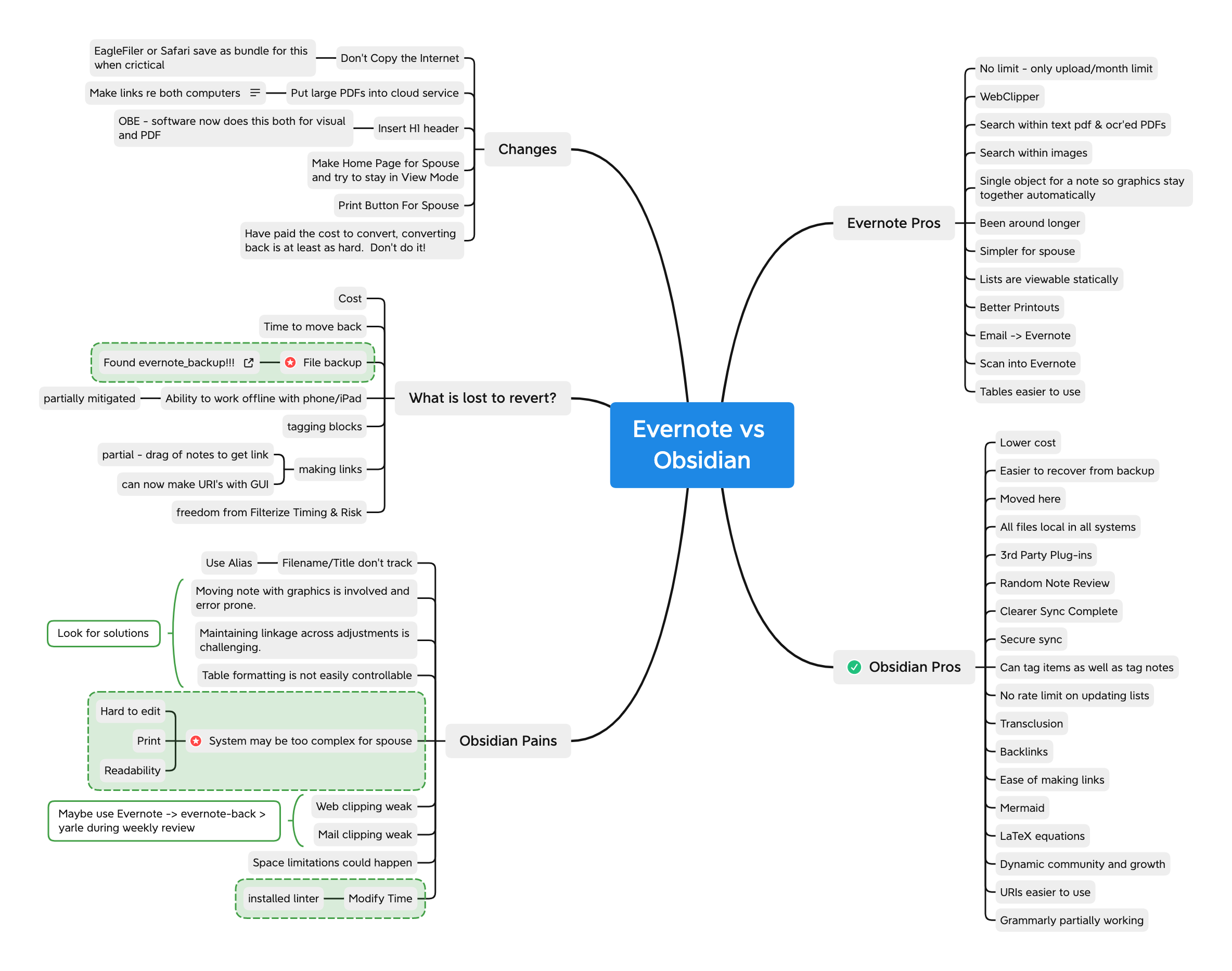
<p>As I often do, I made a mindmap (shown below) to explore the decision.  I would note that the mindmap represents the tradeoffs that existed in May 2022 – both products have changed a bit with Obsidian, as the newer product with community plugins, making larger strides.  You can also see I thought about reverting back as well.</p>

<p><img src="/assets/images/EvernoteVsObsidian.png" alt="Evernote vs Obsidian Mindmap done in XMind by author" /></p>

<p>At this point in time, I still have my Evernote account and content but have not renewed Filterize which changed its pricing model – more than doubling its price to me.  Evernote is still king at Web Clipping, grabbing GMail, as well as other things noted in the Mindmap.  Obsidian shines on the creation side.  I really like the ease of linking notes with WikiLinks which I had previously used with Twiki long ago.  My daily work is in Obsidian and Evernote is not being used except for specific captures.</p>

<p>The specific captures that Evernote does so well include</p>
<ul>
  <li>Web clipping</li>
  <li>PDF indexing and image OCRing</li>
  <li>Mail message captures</li>
</ul>

<h3 id="web-clipping">Web clipping</h3>

<p>Evernote generally does this well and fails much less often than most tools.  That said, I have come to realize that in most cases, I am merely creating a copy of the web in my Evernote storage where I really need to create a short summary of the information (and why it is important to me) and a link to the Internet content.  Generally, I have found that if the content goes away, it probably was not worth permanently having a copy, and even then the <a href="https://web.archive.org">Internet Archive</a> often helps me recover the content.  So with Obsidian, I generally practice this and only make a PDF, Web Archive, custom page in Obsidian, or link to Evernote for those rare pages I think I really want to have. I should note that if you use Google for your search engine and the Evernote clipper plugin, Evernote provides a insert of content from your Evernote into Google search results<sup id="fnref:2" role="doc-noteref"><a href="#fn:2" class="footnote" rel="footnote">2</a></sup>.  The <a href="https://github.com/DominikPieper/obsidian-ReadItLater">Obsidian plugin ReadItLater</a> can often get the information content from a page given the URL.</p>

<h3 id="pdf-indexing-and-image-ocring">PDF indexing and image OCRing</h3>

<p>Evernote automatically indexes PDFs for search.  It will also OCR images (but not images in PDFs like a scanner produces) and indexes this information.  Obsidian does not yet have a similar capability although there are requests for it.  macOS users can search the Obsidian vault (folder) using Spotlight since it indexes .PDF files and I believe it OCRs images today.</p>

<h3 id="mail-message-captures">Mail message captures</h3>

<p>Today’s email message is a complicated collection of HTML intended to deliver information as well as track the user. I have tried to move the message into my note collection for deferred action rather than leave things in my Inbox.  Obsidian often fails to properly render the information as the complexity of the trackers often strains the Markdown encoding.  It is probably good to be reminded of this.  I either fix the content (remove the trackers), make a PDF of the mail, and/or link to the mail inside GMail.</p>

<h3 id="some-of-the-things-evernote-cant-do">Some of the things Evernote can’t do</h3>

<ol>
  <li>Insert links to other content in the collection as quickly as Obsidian WikiLinks.</li>
  <li>Show backlinks (things that link to this note.)  In Evernote, when you are about to delete content, you can not find out if anything links to it.  There are partial work arounds but nothing absolute.</li>
  <li>Manipulate the content with other tools on your computer.</li>
  <li>You can not tag a line in note but only tag the whole note.</li>
  <li>You can not get a random page from your collection presented to you.  This random note feature is useful for both reminding you of information and to provide a way to update your content either by updating or deleting the note.</li>
</ol>

<div class="footnotes" role="doc-endnotes">
  <ol>
    <li id="fn:1" role="doc-endnote">
      <p>Jamie Tood Rubin, <a href="https://jamierubin.net/2021/06/22/evernote-and-obsidian-collecting-vs-creating/">https://jamierubin.net/2021/06/22/evernote-and-obsidian-collecting-vs-creating/</a> <a href="#fnref:1" class="reversefootnote" role="doc-backlink">&#8617;</a></p>
    </li>
    <li id="fn:2" role="doc-endnote">
      <p>See <a href="https://help.evernote.com/hc/en-us/articles/208313708-Evernote-Web-Clipper-related-results">Evernote Web Clipper related results</a> <a href="#fnref:2" class="reversefootnote" role="doc-backlink">&#8617;</a></p>
    </li>
  </ol>
</div>]]></content><author><name>Dave Green</name></author><category term="productivity" /><category term="#evernote" /><category term="#obsidian" /><summary type="html"><![CDATA[Strong linking, community, and portability with more automation options]]></summary></entry><entry><title type="html">Doodle for the rest of us – the meeting participants</title><link href="https://glimmer.gwizlabs.net/blog/2022/02/15/Doodle-for-the-rest-of-us-the-meeting-participants/" rel="alternate" type="text/html" title="Doodle for the rest of us – the meeting participants" /><published>2022-02-15T12:00:00-06:00</published><updated>2022-03-29T13:02:00-05:00</updated><id>https://glimmer.gwizlabs.net/blog/2022/02/15/Doodle-for-the-rest-of-us---the-meeting-participants</id><content type="html" xml:base="https://glimmer.gwizlabs.net/blog/2022/02/15/Doodle-for-the-rest-of-us-the-meeting-participants/"><![CDATA[<p>Update: 20220309</p>

<p>Sigh, I spoke too soon.  It looks like my feature has disappeared again, and worse, they are now also pushing the scheduled date back to a calendar with an option not to do so (if you connect a calendar).  It was a good tool for me before they “evolved it.”</p>

<p>I have left this article in hopes that a solution may occur.</p>

<hr />

<p>Like other calendar tools, <a href="https://doodle.com">Doodle</a> has features to support establishing a meeting time.  The primary focus is appropriately on the meeting planner, but Doodle also has valuable features for the participant.  This note looks at those features available to the participant <strong>if the participant subscribes to Doodle</strong>.</p>

<p>The features that are available to the subscribing participant include</p>

<ol>
  <li>Receiving a meeting request that is aware of the participant’s calendar(s)</li>
  <li>Having the non-conflicting times automatically selected as a suggestion</li>
  <li>Seeing the proposed times against the user’s calendar entries</li>
  <li>Have a local calendar populated from an .ics feed</li>
  <li>Ability to click on one of these proposed times to find the link to Doodle to allow deleting this choice from the available list</li>
  <li>See the proposed times disappear except for the one chosen for the meeting</li>
</ol>

<p>In a Doodle code update, I would note that features 4, 5, and 6 disappeared for a time but thankfully returned.  This disappearance prompted this article to make sure that these features are appreciated and that everyone is considering taking advantage of them.</p>

<p>I attend many more meetings as a participant than an organizer in my world.  As a participant, I get many requests for multiple times as the meeting planners try to find times that work for everyone in a worldwide pool of volunteers for a technical professional organization.  It is easy to determine my availability for the first meeting request but becomes more difficult as the number of pending meetings grows.  The polls for meeting times can be active for 7-10 days.  By subscribing to the Doodle feed, I can have entries in my calendar to know where I have already answered “available” incorporate that into planning and other meeting responses.  The ability to get back to the open poll and change my entry allows me to deal with a new activity that I wish to put in a slot I have already indicated availability for updating the meeting planner’s information.  Finally, who wouldn’t like all the non-chosen times to disappear automatically from their calendar!</p>

<p>I have written a couple of times (<a href="https://glimmer.gwizlabs.net/blog/2010/11/07/doodle-best-practices/">Doodle Best Practices</a>, <a href="https://kb.ieee.org/mga/vtools/using-doodle/scheduling-a-doodle-meeting/">Scheduling a Doodle Meeting</a>) to provide information to the meeting planner to support the participant.  The most crucial point is to select the final meeting time in Doodle, so the other times disappear.  When this does not happen, I either email the meeting organizer or delete my (other) responses from the Doodle poll.</p>

<p>If you are a Doodle subscriber and a frequent meeting participant (who isn’t?) be sure to check out these features if you are not already taking advantage of them.</p>]]></content><author><name>Dave Green</name></author><category term="productivity" /><category term="collaborate" /><category term="#calendar" /><summary type="html"><![CDATA[A story that now has a sad ending]]></summary></entry><entry><title type="html">Staying with Evernote</title><link href="https://glimmer.gwizlabs.net/blog/2021/12/31/staying-with-evernote/" rel="alternate" type="text/html" title="Staying with Evernote" /><published>2021-12-31T16:20:00-06:00</published><updated>2022-05-26T13:02:00-05:00</updated><id>https://glimmer.gwizlabs.net/blog/2021/12/31/staying-with-evernote</id><content type="html" xml:base="https://glimmer.gwizlabs.net/blog/2021/12/31/staying-with-evernote/"><![CDATA[<h3 id="in-the-my-beginning">In the (my) beginning</h3>

<p>I have been using (and paying for) <a href="https://evernote.com">Evernote</a> since <a href="/blog/2008/08/25/evernote/">2008</a>.  It had many innovative features:</p>

<ul>
  <li>good search including inside PDFs and text within images</li>
  <li>phone-based scanning application that produces Evernote pages, and if the scan is of a business card provides the ability to start an entry in the contacts application.</li>
  <li>They had an interesting storage limitation – choosing to limit the uploaded amount per month rather than the total storage on the server.  I use <em><a href="https://filterize.net">Filterize</a></em> to provide automation by clearing completed checklists, auto-tagging notes, generating “table of contents” type pages.</li>
</ul>

<h3 id="the-storm--evernote-10">The Storm – Evernote 10</h3>

<p>The move to Evernote 10 and an <a href="https://evernote.com/blog/new-windows-mac/">Electron implementation rather than a native implementation</a> generated a good bit of turmoil because Evernote chose to release a product that did not have all the prior features.  Some features have come back, some have not (and probably won’t).  The big problem for me was that the new approach was not optimized and was very power-hungry – my 6-8 hour battery life turned into 1.5-2 hours with Evernote running.</p>

<h3 id="the-search-for-the-promised-land">The Search for the promised land</h3>

<p>For the last two years, I have maintained an Evernote Alternatives page tracking the features I need and information about how other apps stack up to this list of features.  Applications that have been looked at include</p>

<ul>
  <li><a href="https://www.apple.com/macos/monterey/features/">Apple Notes (part of macOS)</a> - which continues to improve each release</li>
  <li><a href="https://obsidian.md">Obsidian</a></li>
  <li><a href="https://www.craft.do">Craft</a></li>
  <li><a href="https://joplinapp.org">Joplin</a></li>
  <li><a href="https://www.devontechnologies.com">DevonThink</a></li>
  <li><a href="https://nimbusweb.me">Nimbus</a></li>
  <li><a href="https://www.notion.so/product?fredir=1">Notion</a></li>
  <li><a href="https://bear.app">Bear</a></li>
</ul>

<p>The website <a href="https://www.noteapps.info">NoteApps.info</a> is an excellent tool for looking at the various alternatives to look at important dimensions.</p>

<p>Of course, it is hard to change.  I have over 5800 notes (down from 8000).  I have used Evernote to export slices of this to their ENEX format and then <a href="https://github.com/wormi4ok/evernote2md">evernote2md</a> to convert the information to Markdown to import to other apps.  Even though quite a few things have changed along the way, I am far along the learning curve with Evernote, and migrating over is challenging.</p>

<h3 id="there-is-no-place-like-home-even-with-its-problems">There is no place like home (even with its problems)</h3>

<p>I have recently upgraded to a MacBook Pro 14 with an M1 Pro chip.  Between the improved M1 Pro efficiency and the improvements that have finally occurred with Evernote, the power issue is substantially less painful and no longer driving the need to change.  Had it not been for the pandemic-driven reduction of my travel, I would have been forced to either migrate or not keep Evernote loaded.  Of course, Evernote made the second option challenging since they don’t support starting up offline, forcing a traveler to keep it loaded if it is the center of their information universe.</p>

<p>With the power issue mitigated, I have ended my alternative evaluation and will stay with Evernote.  Today I am deleting the Joplin, Craft, and Obsidian programs and moving back to focusing on my work rather than the search for an Evernote replacement.  Undoubtedly, these products, Evernote, and others are building very innovative, useful products and seem to each have their passionate followers.  One can visit the <a href="https://discussions.evernote.com">Evernote Forums</a> and see that not everyone has stopped searching for other tools.  My present conclusion is that Evernote has several problems, but so do the alternatives, and I know less about them.  It is good enough!</p>

<p>Recent neat things that make Evernote even better for me feature-wise include:</p>

<ul>
  <li><del>Grammarly Desktop works inside Evernote (done by Grammarly, not Evernote)</del> <sup id="fnref:1" role="doc-noteref"><a href="#fn:1" class="footnote" rel="footnote">1</a></sup></li>
  <li>Google Calendar linkage to notes</li>
  <li>Tasks</li>
  <li>Home view of Evernote</li>
  <li>Reinstatement of the ⌘+ J search shortcut</li>
</ul>

<h3 id="suggestions-for-a-brighter-future">Suggestions for a Brighter Future</h3>

<p>Things that I think they need to do</p>

<ol>
  <li>Make an M1 native (or universal) app for the Mac.</li>
  <li>Let me start the desktop version without the network.  I understand there may be a reason to check in with the server, but I think that could move to only be required on a weekly or monthly basis rather than each startup.</li>
  <li>Provide an efficient backup mechanism (it would also help in migrating, of course). They should look at Google Takeout.</li>
  <li>Provide a way to reset checklists for re-use</li>
  <li>Avoid regressions in sync that cause duplicate copies</li>
</ol>

<p>Things that would be nice for them to do:</p>

<ol>
  <li>Support source code highlighting and graphics like <a href="https://mermaid-js.github.io/mermaid/#/">mermaid</a>.</li>
  <li>Restore the Sync button to the desktop to allow one to know that all syncing that can be done has been done.</li>
</ol>

<div class="footnotes" role="doc-endnotes">
  <ol>
    <li id="fn:1" role="doc-endnote">
      <p>Evernote and Grammarly Desktop are <em>not</em> working together after just a brief time when they did.  This is acknowledged by both vendors (<a href="https://support.grammarly.com/hc/en-us/articles/4428282986893-Grammarly-for-Mac-doesn-t-work-in-certain-apps-for-Mac">Grammarly’s post</a>) so it may be a while before this support returns. (added 20220526) <a href="#fnref:1" class="reversefootnote" role="doc-backlink">&#8617;</a></p>
    </li>
  </ol>
</div>]]></content><author><name>Dave Green</name></author><category term="productivity" /><category term="#evernote" /><summary type="html"><![CDATA[Staying with Evernote 10 -- it is good enough]]></summary></entry><entry><title type="html">Typora - Markdown Editor</title><link href="https://glimmer.gwizlabs.net/blog/2021/12/31/typora-markdown-editor/" rel="alternate" type="text/html" title="Typora - Markdown Editor" /><published>2021-12-31T16:20:00-06:00</published><updated>2021-12-31T16:20:00-06:00</updated><id>https://glimmer.gwizlabs.net/blog/2021/12/31/typora-markdown-editor</id><content type="html" xml:base="https://glimmer.gwizlabs.net/blog/2021/12/31/typora-markdown-editor/"><![CDATA[<script type="text/javascript" id="MathJax-script" async="" src="https://cdn.jsdelivr.net/npm/mathjax@3/es5/tex-svg.js">
</script>

<script src="https://cdn.jsdelivr.net/npm/mermaid/dist/mermaid.min.js"></script>

<script>
 mermaid.initialize({ startOnLoad: true });
</script>

<p>While catching up on my reading, I came across a reference (and praise) for <a href="https://typora.io">Typora</a>, a new markdown editor, that had recently come out of a long beta cycle.  I do a lot of composing in markdown (usually in VSCode) and use Marked 2 for preview and publishing.</p>

<p>Typora’s website provides an excellent introduction to the tool.  Typora allows you to type markdown and quickly see the impact of any markup when you aren’t editing that section of the text.  I also noted that my <a href="https://www.grammarly.com/desktop">Grammarly Desktop app</a> provides its services in the composition process.</p>

<p>Typora allows one to have the front-matter at the top of the file required by MultiMarkdown and Jekyll.  It also incorporates source code highlighting, showing linked images, \(\LaTeX\)-style math equations such as</p>

\[\tan(x) = \frac{\sin(x)}{\cos(x)},\]

<p>and <a href="https://mermaid-js.github.io/mermaid/#/">Mermaid drawings</a> such as</p>

<div class="mermaid">
sequenceDiagram
    title: User deposits $100 into checking account
    actor User
    participant CheckingAccount
    note right of CheckingAccount:  increases balance from <br />$1000 to $1100 which is logged 
    participant TLogger
    User-&gt;&gt;CheckingAccount: deposit(10000)
    activate CheckingAccount
    CheckingAccount-&gt;&gt;TLogger: logTransaction(name,'deposit',10000,110000)
    activate TLogger
    deactivate TLogger
    deactivate CheckingAccount
</div>

<p>To use the generated markdown in Jekyll to embed \(\LaTeX\), one must include the non-code block text</p>

<div class="language-html highlighter-rouge"><div class="highlight"><pre class="highlight"><code><span class="nt">&lt;script </span><span class="na">type=</span><span class="s">"text/javascript"</span> <span class="na">id=</span><span class="s">"MathJax-script"</span> <span class="na">async</span>
  <span class="na">src=</span><span class="s">"https://cdn.jsdelivr.net/npm/mathjax@3/es5/tex-svg.js"</span><span class="nt">&gt;</span>
<span class="nt">&lt;/script&gt;</span>
</code></pre></div></div>

<p>somewhere, while using Mermaid will require including the non-code block text</p>

<div class="language-html highlighter-rouge"><div class="highlight"><pre class="highlight"><code><span class="nt">&lt;script </span><span class="na">src=</span><span class="s">"https://cdn.jsdelivr.net/npm/mermaid/dist/mermaid.min.js"</span><span class="nt">&gt;&lt;/script&gt;</span>
<span class="nt">&lt;script&gt;</span>
 <span class="nx">mermaid</span><span class="p">.</span><span class="nx">initialize</span><span class="p">({</span> <span class="na">startOnLoad</span><span class="p">:</span> <span class="kc">true</span> <span class="p">});</span>
<span class="nt">&lt;/script&gt;</span>
</code></pre></div></div>

<p>and changing the Jekyll-bound markdown to remove the Mermaid code block and wrap the code with use <code class="language-plaintext highlighter-rouge">&lt;div class="mermaid"&gt;...&lt;/div&gt;</code></p>

<p>Typora has a 15-day trial and costs $15 (one-time) for continued use.  Typora is licensed per user and allows use on three devices.  The site also notes that versions are available for macOS, Linux, and Windows.</p>]]></content><author><name>Dave Green</name></author><category term="productivity" /><category term="communicate" /><category term="#jekyll" /><summary type="html"><![CDATA[A Well Designed Markdown Editor for Writing]]></summary></entry><entry><title type="html">Finally Moving On</title><link href="https://glimmer.gwizlabs.net/blog/2021/09/09/finally-moving-on/" rel="alternate" type="text/html" title="Finally Moving On" /><published>2021-09-09T01:20:00-05:00</published><updated>2021-09-09T01:20:00-05:00</updated><id>https://glimmer.gwizlabs.net/blog/2021/09/09/finally-moving-on</id><content type="html" xml:base="https://glimmer.gwizlabs.net/blog/2021/09/09/finally-moving-on/"><![CDATA[<p>After eight years of using Octopress, this site is moving to a purer <a href="https://jekyllrb.com">Jekyll</a> blog using <a href="https://mademistakes.com/work/minimal-mistakes-jekyll-theme/">Minimal Mistakes Theme</a>.  I have previously written about the problems of keeping it going (<a href="/blog/2014/09/01/waiting-on-migration-tools-for-octopress-3">1</a>, <a href="/blog/2019/12/16/limping-along-with-octopress-and-catalina-macos">2</a>) and have looked at alternatives several times.  Recently I built a couple of other small websites using Jekyll.  The straw that moved me to action was discovering that the JQuery version used had several security issues.  Rather than work through that problem with the likelihood of other problems, I decided to experiment with moving my content.</p>

<p>Markdown provides a lot of portability.  I now use <a href="https://code.visualstudio.com">VSCode</a> as my primary editor, and it has a great “Find in Files” and “Replace in Files” that allows making modifications to existing content.  This content goes back to 2008 with original hosting on Tumblr (<a href="/blog/2007/04/08/congratulations-on-bringing-light-into-the-dark-room">in</a>, <a href="/blog/2013/05/27/Tumbling-out">out</a>).</p>

<p>I will likely find items to repair, create a better home page, and rationalize categories and tags, but it looks like I can preserve the permalinks so that URLs still work.</p>

<p>It looks like categories should be limited (perhaps related to roles) with many more tags.  Each tag will start with a number sign (#).</p>

<p>Perhaps the roles can be teach, developer, productivity, personal, and citizen.</p>]]></content><author><name>Dave Green</name></author><category term="personal" /><category term="communicate" /><category term="news" /><category term="#octopress" /><category term="#jekyll" /><category term="#upgrading" /><summary type="html"><![CDATA[After eight years of using Octopress, this site is moving to a purer Jekyll blog using Minimal Mistakes Theme. I have previously written about the problems of keeping it going (1, 2) and have looked at alternatives several times. Recently I built a couple of other small websites using Jekyll. The straw that moved me to action was discovering that the JQuery version used had several security issues. Rather than work through that problem with the likelihood of other problems, I decided to experiment with moving my content.]]></summary></entry></feed>